
Learn to trade ICT,
from scratch.
The course, the glossary and the diagrams are free, no sign-up. Start from your first chart and move at your own pace.
Start the free course →What I can show
- Apex 50K evaluation passed with the indicator alone →
- Payouts received from Apex and Topstep, screenshots included →
- 10 trades from the challenge published, losses included →
Past results, shown as they are. They promise nothing about yours.
Never placed an order?
Start here, for free. An eighteen-step course that starts from zero: what a price really is, how to read a candle, what leverage is, how an order is placed, and what all of it costs. No prerequisites, and nothing to buy.
Understanding what you are getting into
What a price actually is, who is on the other side, what a broker earns, and why the leverage handed to you unasked is the first thing to understand.
4 steps · 1–4Reading a chart
The candle, timeframes, what you can see on a chart before having any method at all, and how the movement is counted.
4 steps · 5–8Placing a trade without hurting yourself
Order types, the stop-loss, the only number that matters at the start, why you can be wrong six times out of ten and still win, and what all of it actually costs.
5 steps · 9–13Getting started
Which market to choose, the three tools that are enough, the journal nobody keeps, what actually makes beginners fail, and your first month week by week.
5 steps · 14–18Learn trading by playing
A way of learning you will not find in trading courses: 29 games on real Nasdaq and gold charts. You tap the chart, the game tells you why you are right or wrong. No sign-up.
8 chapters and an exam, from the first candle to the first trade.
Start the path →You know the basicsThe ICT exercises20 concepts to spot: FVGs, order blocks, liquidity, killzones…
See the exercises →You want to competeThe battleA real session, the same candles for everyone: prepare, trade, and climb the daily leaderboard.
Play the battle →Jump straight in:Fair Value GapOrder blockStop huntKillzonesChange of Character
The whole ICT vocabulary, with a diagram for every term
Order block, liquidity, fair value gap, killzone: the terms that come up everywhere in the method, explained one by one and sorted by difficulty level. Every entry has its own hand-drawn diagram.
Market structure
The sequence of highs and lows that shows whether the market is bullish, bearish or ranging.
Liquidity (buy-side / sell-side)
Pools of resting stop orders sitting above highs (buy-side) and below lows (sell-side).
Order Block
The last opposite candle before a strong impulsive move, thought to mark a zone of institutional orders.
Fair Value Gap (FVG)
An imbalance across three candles, leaving a price gap the market tends to come back and fill.
Premium / Discount
The upper half of a range is expensive (premium), the lower half cheap (discount) — you buy low and sell high.
Killzone
A precise time window when volatility and volume are historically at their highest.
Three ICT strategies, written down to the point
Silver Bullet, Power of Three, OTE: the rules in black and white, one setup broken down and eight real Nasdaq sessions, losers included. Free in exchange for your email.

The Silver Bullet — field guide
The rules written down to the point, one setup broken down in five steps, and eight real Nasdaq sessions — winners, losers, and the one where doing nothing was right.
- 34 pages
- 8 real sessions
- 14 annotated charts
Power of Three & Judas Swing — field guide
Six days read with hindsight, two of which the frame does not fit, then the rules to trade the Judas in real time, one example broken down and eight real executions.
- 41 pages
- 8 real executions
- 30 annotated charts
The OTE — field guide
The impulse that counts, the 62–79% zone, the 70.5% entry: the rules written down to the point, one setup broken down and eight real Nasdaq sessions.
- 34 pages
- 8 real sessions
- 13 annotated charts
Learn ICT for free, then move to the indicator
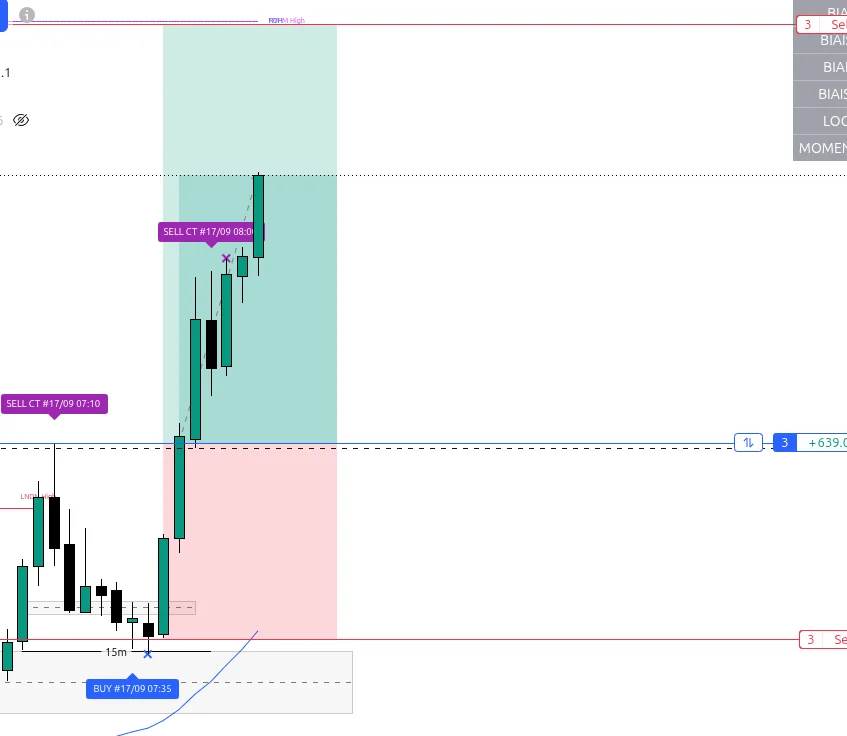
The course, glossary and guides above teach you to spot a liquidity sweep by hand. FTS Liquidity Sweep Pro makes that same reading continuously on your TradingView chart — and stops exactly where your decision begins.
I wrote it myself, in Pine Script. It sets a bias from a configurable reference structure — 4-hour by default, daily as an option — then spots liquidity sweeps on your own timeframe and marks the level being used. It draws no stop and no target, and places no orders: the entry, the stop, the size and the decision to take the setup stay yours.
- Platform
- TradingView, even the free plan
- Markets
- Futures, Forex, indices, crypto
- Trial
- 3 days free
- Setup
- 1 minute, no code
To go all the way: four premium guides
Risk and psychology, my complete method, the Market Maker Model and one scalping setup. Each in English and French, on its own or in the bundle of all four.

Risk & Psychology
Risk in numbers, prop firms and the traps of the mind, one by one.
- 55 pages
- 41 sheets
- 10,000 simulated accounts

The Complete Model
My full method: 4H bias, 15-min signal, 5-min confirmation, 75/25 exits.
- 46 pages
- 33 sheets
- 6 real sessions

The Market Maker Model
Read the complete price curve, with written rules and six real models.
- 40 pages
- 28 sheets
- 6 real models

One-Minute Scalping
One scalping setup: BOS, FVG, limit entry, fixed 0.5 R target.
- 54 pages
- 40 sheets
- 10 real trades
Get the next letter
Where the challenge stands, losses included, the new articles and one ICT notion explained simply. Free, one-click unsubscribe.
You will get a confirmation email: nothing is sent before you click it.
A question? Write to me.
I reply personally, usually within 24h.